SPSS Modeler for Non-Programmers | Module 1 | Lesson 1
Introduction to Data Mining and Data Science
Build a plain-language foundation for data mining, data science, machine learning, prediction, and ethical use before opening SPSS Modeler.
Expanded lessonBeginner to advanced85 minutesFree Public Lesson
Lesson Overview
What this lesson teaches
This lesson explains the larger purpose of data mining and data science for non-programmers. It clarifies key terms, shows how predictive thinking differs from traditional reporting, and prepares learners to recognize when machine learning is appropriate, useful, risky, or overclaimed.
Method category
Foundation
Best beginner use case
A learner is starting the course and needs a clear mental model before choosing methods or building streams.
Estimated time
85 minutes for the full lesson; 20 minutes for the quick-start path.
Workflow focus
Terminology, prediction goals, data science versus data mining, model purpose, business use, and ethics.
Learner levels
Beginner: understand the idea. Applied: use it in SPSS Modeler or a project. Advanced: defend decisions, limitations, and reporting choices.
Learning Path
Choose the level that matches your project
Use this lesson in layers. Start with the beginner path if the topic is new. Move into the applied and advanced sections when you need to complete a project, explain decisions, or write a stronger report.
Beginner
Learn the vocabulary
Clarify data mining, data science, artificial intelligence, machine learning, deep learning, big data, prediction, and pattern discovery.
Applied
Connect terms to projects
Translate a real business, research, or class question into a predictive or exploratory data mining goal.
Advanced
Judge claims carefully
Recognize hype, weak causal language, ethical concerns, privacy issues, and the limits of predictive modeling.
Learning Objectives
By the end of this lesson, you should be able to:
Explain data mining and data science in plain language.
Differentiate reactive, proactive, and predictive thinking.
Recognize how machine learning supports predictive modeling.
Describe how data mining differs from traditional statistical analysis.
Identify common business and research uses of data mining.
Explain why model results should not be treated as automatic truth.
Name ethical issues such as privacy, de-identification, fairness, and responsible interpretation.
Prepare a one-sentence project goal that can later guide method selection.
Beginner Quick Start
The big picture in 10 plain-language ideas
Read this first if the terminology feels confusing. The goal is not memorization. The goal is to understand what kind of work this course is preparing you to do.
Data mining looks for useful patterns. It uses data and algorithms to find patterns that can support prediction, classification, grouping, or better decisions.
Data science is broader. Data science includes data collection, cleaning, visualization, modeling, communication, and decision support.
Machine learning is a toolset. Machine learning methods train models from data instead of requiring every rule to be programmed by hand.
Prediction is not the same as certainty. A predictive model estimates likely outcomes. It does not guarantee what will happen for every individual case.
Reactive work explains what happened. A reactive strategy looks backward after an event has occurred.
Proactive work reduces risk before the event. A proactive strategy uses evidence to prevent problems or improve processes before damage happens.
Predictive work estimates what may happen next. A predictive strategy uses patterns in data to anticipate future or unseen outcomes.
Data mining often needs many records. Algorithms usually need enough cases to learn stable patterns and enough fields to evaluate possible predictors.
Useful models still need human judgment. The analyst must check data quality, model fit, fairness, interpretability, and whether the result makes sense.
Ethics belongs at the beginning. Privacy, consent, de-identification, and responsible reporting should be considered before model building, not after.
Core Concepts
Key terms that learners must separate
Many learners get stuck because the same words are used loosely online. This section turns the vocabulary into practical distinctions.
Data mining
A focused process for using data and machine learning methods to discover patterns that can support prediction or decision-making.
Data science
A broader field that includes problem framing, data preparation, analysis, visualization, modeling, deployment, and communication.
Artificial intelligence
A broad area concerned with systems that perform tasks associated with intelligent behavior, such as learning, planning, language, or recognition.
Machine learning
A family of methods where the model learns patterns from examples rather than relying only on hand-written rules.
Deep learning
A specialized machine learning approach that uses layered neural networks and often requires large data and substantial computing resources.
Predictive modeling
The practical process of training and evaluating a model so it can estimate an outcome for new or unseen cases.
Decision Guide
How do you know this is a data mining project?
Use this guide before selecting software or algorithms. A project becomes a data mining project when the goal involves learning from data to predict, classify, group, or discover patterns.
Question
If yes
If no
Do you have a clear outcome to predict?
You may need supervised learning such as classification or prediction.
You may need exploration, visualization, clustering, or dimension reduction.
Do you need to identify hidden groups or patterns?
Unsupervised learning may fit the project.
A descriptive report or traditional analysis may be enough.
Is the dataset large or complex enough for modeling?
Data mining may add value if patterns are not obvious.
Start with descriptive statistics and visualization first.
Will the result guide action?
Define the decision the model will support.
Avoid modeling only because a tool is available.
Could the result affect people?
Plan privacy, fairness, and cautious reporting.
Still document assumptions and limitations.
Practical rule: Start with the problem and decision, not the algorithm. A method is useful only if it helps answer the project question responsibly.
Workflow Overview
From question to responsible prediction
Problem
Data
Exploration
Method Choice
Model
Evaluation
Interpretation
Action
This sequence prepares learners for later SPSS Modeler lessons. The software workflow should always serve the project question, not replace it.
Before You Start
Confirm the learning foundation
Before moving into SPSS Modeler, make sure you can explain the project in everyday language.
Write the project question in one sentence.
Identify whether the goal is prediction, grouping, explanation, or reporting.
Name the target outcome if there is one.
List the type of data available.
State who will use the result and why.
Identify one possible ethical or privacy concern.
Decide whether model output should be interpreted as prediction, association, or causal evidence.
Step-by-Step Tutorial
Turn an idea into a data mining goal
State the real-world problem. Write what decision, risk, or process the project should improve.
Identify the outcome or pattern of interest. For supervised learning, name the target. For unsupervised learning, describe the pattern you want to explore.
Identify candidate inputs. List fields that may help explain or predict the outcome, while excluding fields that would reveal the answer unfairly.
Choose the modeling purpose. Decide whether the project is classification, numeric prediction, clustering, association, dimension reduction, or report support.
Define success before modeling. Decide what a useful result would look like: accuracy, interpretability, lift, reduced risk, better segmentation, or clearer reporting.
Name the audience. A class assignment, business report, and research project need different explanation styles.
Add an ethics check. Ask whether the data are private, sensitive, biased, or used in a way that could harm people.
Prepare for the next lesson. Translate the goal into SPSS Modeler terms: fields, target, inputs, nodes, stream, and outputs.
SPSS Modeler Software Steps
Open the software and recognize the workspace
Use these actions to turn the lesson vocabulary into something visible on the SPSS Modeler canvas. The goal is orientation, not modeling yet.
Highlighted labels identify SPSS Modeler nodes or tools learners should add, open, or connect in the stream. Output names and evaluation metrics are left unhighlighted unless they are actual nodes. Menu and node names follow IBM SPSS Modeler 19 terminology.
Start a new stream Click path: Open SPSS Modeler, then choose File > New Stream or use the blank stream that opens at startup. What to check: Confirm that you can see the stream canvas in the center and the node palettes along the bottom or side.
Add a data source Click path: From the Sources palette, drag an Excel node, Statistics File node, Database node, or Var. File node onto the canvas. Double-click the node, browse to the data file, and preview the records. What to check: The preview should show the fields and rows you expected. If the wrong file opens, fix the source before adding any model nodes.
Attach a Type node Click path: From the Field Ops palette, drag a Type node onto the canvas. Connect the source node to the Type node by dragging from the source output connector to the Type node. What to check: Open the Type node and review field roles and measurement levels. At this stage, simply notice which fields could become targets or inputs later.
Run a first data audit Click path: From the Output palette, drag a Data Audit node after the Type node. Right-click the Data Audit node and choose Run, or select the node and use the toolbar run button. What to check: Look for missing values, unusual field types, category counts, and numeric ranges. This output connects the abstract idea of data quality to the software.
Save the orientation stream Click path: Choose File > Save Stream As and give the stream a lesson-specific name such as lesson-01-orientation.str. What to check: Saving the stream teaches the basic work habit used throughout the course: source, type check, audit, then decide what comes next.
Configuration checklist
Use this table while opening node dialogs. Start with the recommended choice, then change only when the project question or validation evidence gives a reason.
Node or tab
Setting to select
Recommended starter choice
When to change it
Source node
Data file path and preview
Browse to the correct dataset, then click Preview before adding other nodes.
Change the path if the field list, row count, or file name does not match the project.
Type node / Roles
Role for each field
Set obvious IDs to Record ID or None; leave possible predictors as Input only after the goal is clear.
Change roles when the project question, target field, or leakage risk changes.
Type node / Measurement
Categorical, ordinal, continuous, or typeless field treatment
Match the measurement level to the meaning of the field, not only how it is stored in the file.
Change it if charts or models treat a category code as a continuous number.
Data Audit node
Quality and distribution review
Run the audit after the Type node and review missing values, ranges, and category counts.
Run it again after cleaning, filtering, or deriving fields.
Stream file
Save Stream As
Save the orientation stream with a clear project or lesson name.
Save a new version before major preparation or modeling changes.
Node labels
Readable names on the canvas
Label the source, Type check, and audit nodes so the stream can be read left to right.
Rename nodes when branches multiply or when the project purpose becomes more specific.
These visuals are arranged in the order learners use them. Begin with the idea, match it to the SPSS Modeler action, read the resulting evidence, and decide whether that evidence belongs in the report. The variables and values shown in software outputs are intentionally preserved so the explanation matches the screen.
Use these diagrams to define the kind of work the software will perform and the boundary between a useful prediction and an unsupported claim.
ConceptLearning aid
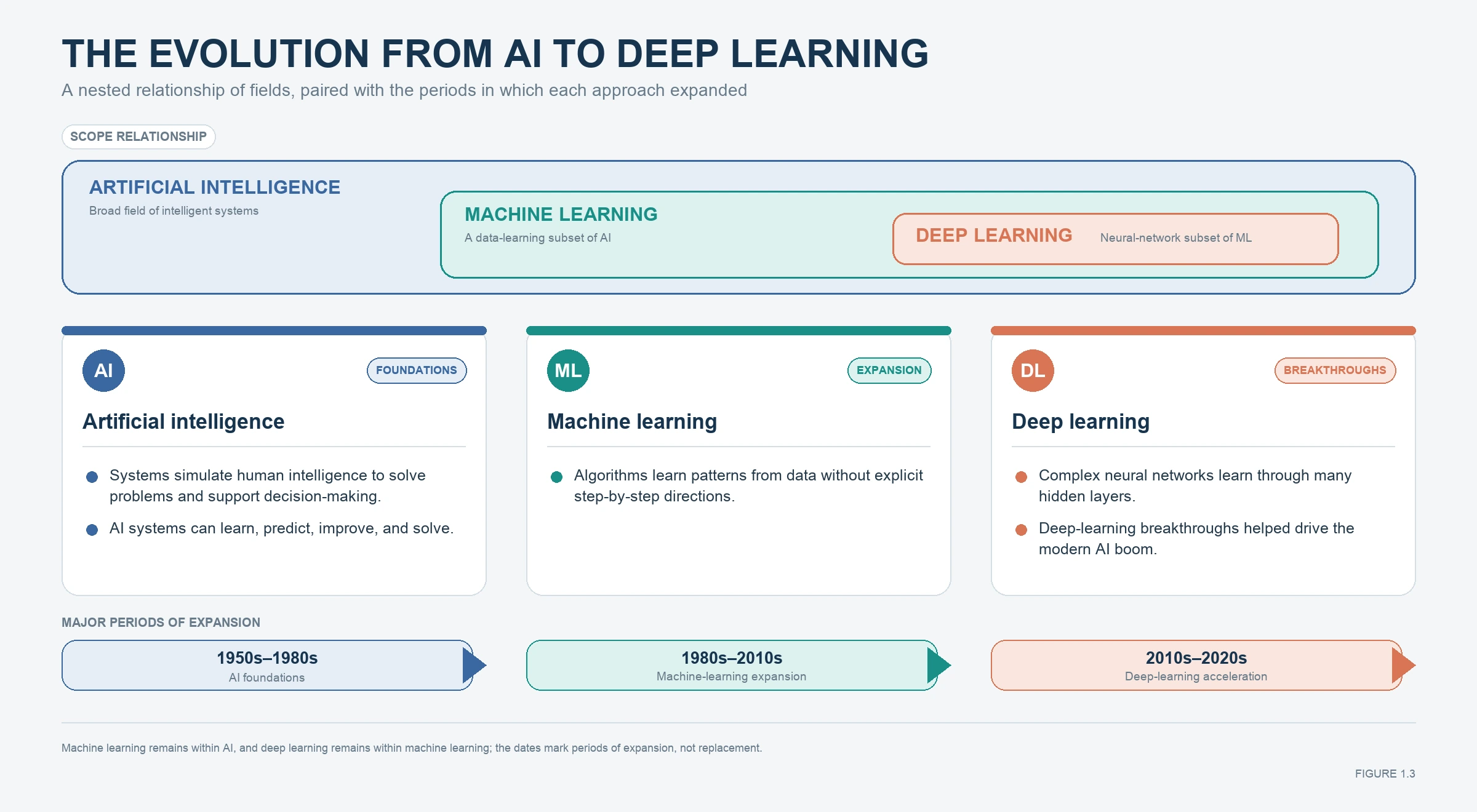
AI, machine learning, and deep learning
What this visual shows: Use this evolution map to separate artificial intelligence, machine learning, and deep learning before choosing a method.
What to inspect: Match the question, target type, learning type, and desired output to the method family before opening a model node.
Connection and report use: Connect this to the Core Concepts on the distinction among data mining, data science, machine learning, prediction, and responsible use and use it to justify the Source → Type → Data Audit orientation stream. It is a learning or methods visual, not a model result.
ConceptLearning aid
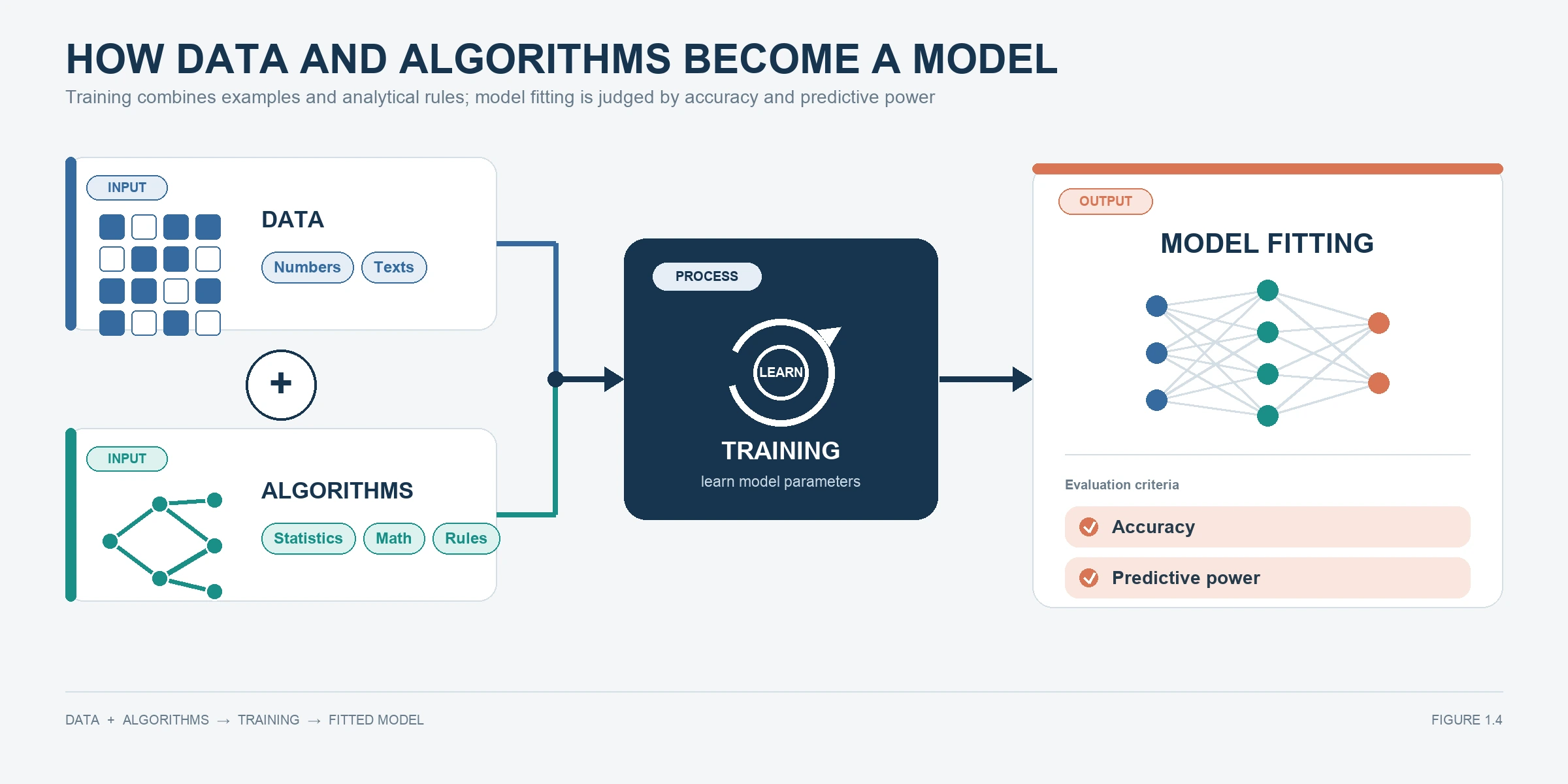
How data and algorithms become a model
What this visual shows: This visual shows how data and algorithms combine into model fitting; use it to explain why SPSS Modeler work should begin with a clear prediction purpose.
What to inspect: Trace raw records through field preparation and algorithm training to predictions, then identify where held-out evaluation and human judgment enter before a decision.
Connection and report use: Connect this to the Core Concepts on the distinction among data mining, data science, machine learning, prediction, and responsible use and use it to justify the Source → Type → Data Audit orientation stream. It is a learning or methods visual, not a model result.
2
2. Connect the idea to the workflow
Follow the flow from data source through analysis and decision. Match each stage to the Source, Type, and Data Audit actions in the numbered software steps.
SoftwareMethods evidence
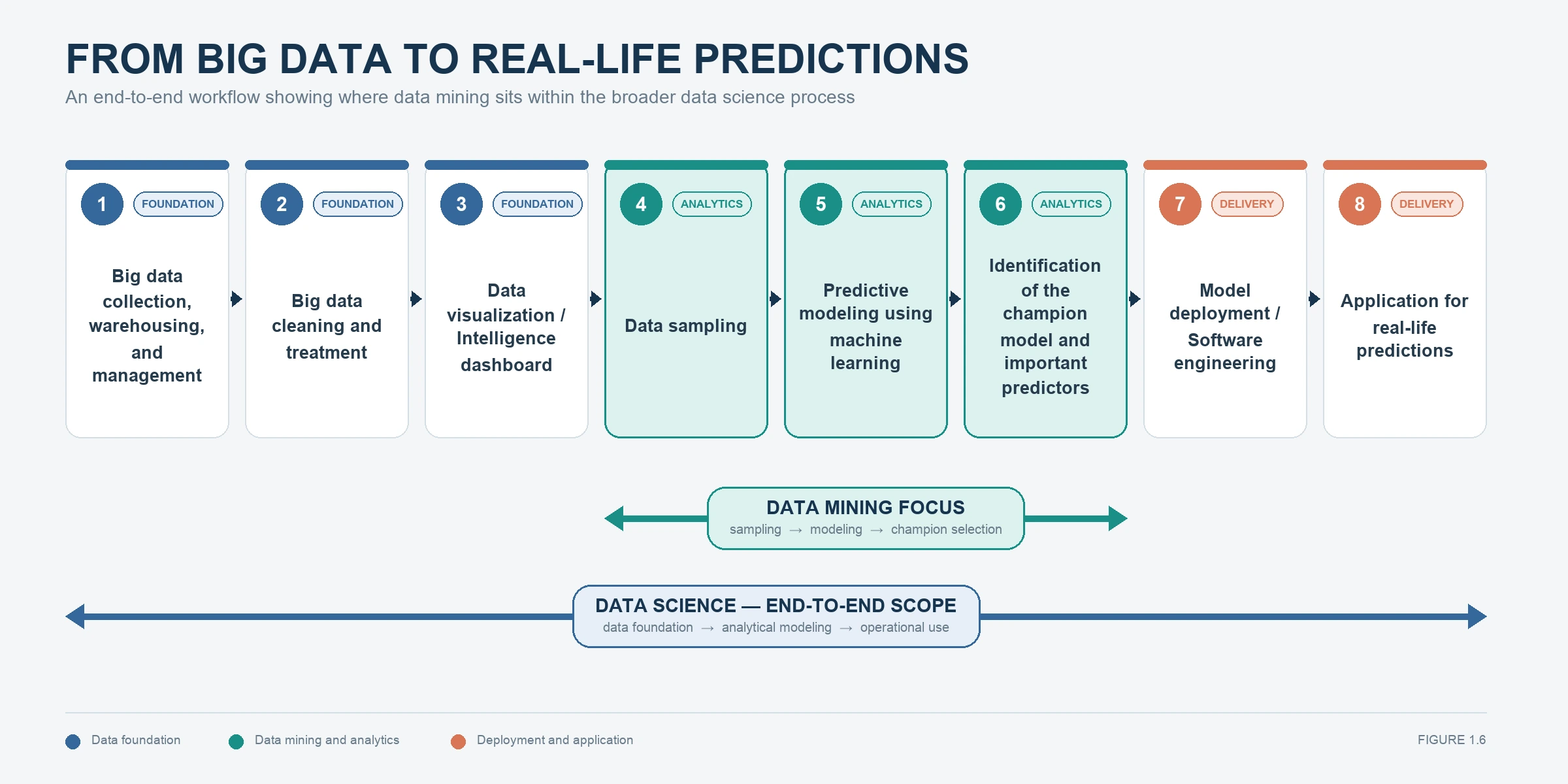
From data to real-life prediction
What this visual shows: This visual maps the larger data-mining workflow; after saving the stream, check that the software work still follows this sequence.
What to inspect: Read the nodes left to right and verify that source, role review, audit, preparation, partition, model, and evaluation appear in a defensible order.
Connection and report use: Match this visual to the Source → Type → Data Audit orientation stream. It verifies how the analysis was set up; describe the material choice in Methods rather than presenting the screenshot as a finding.
SoftwareMethods evidence
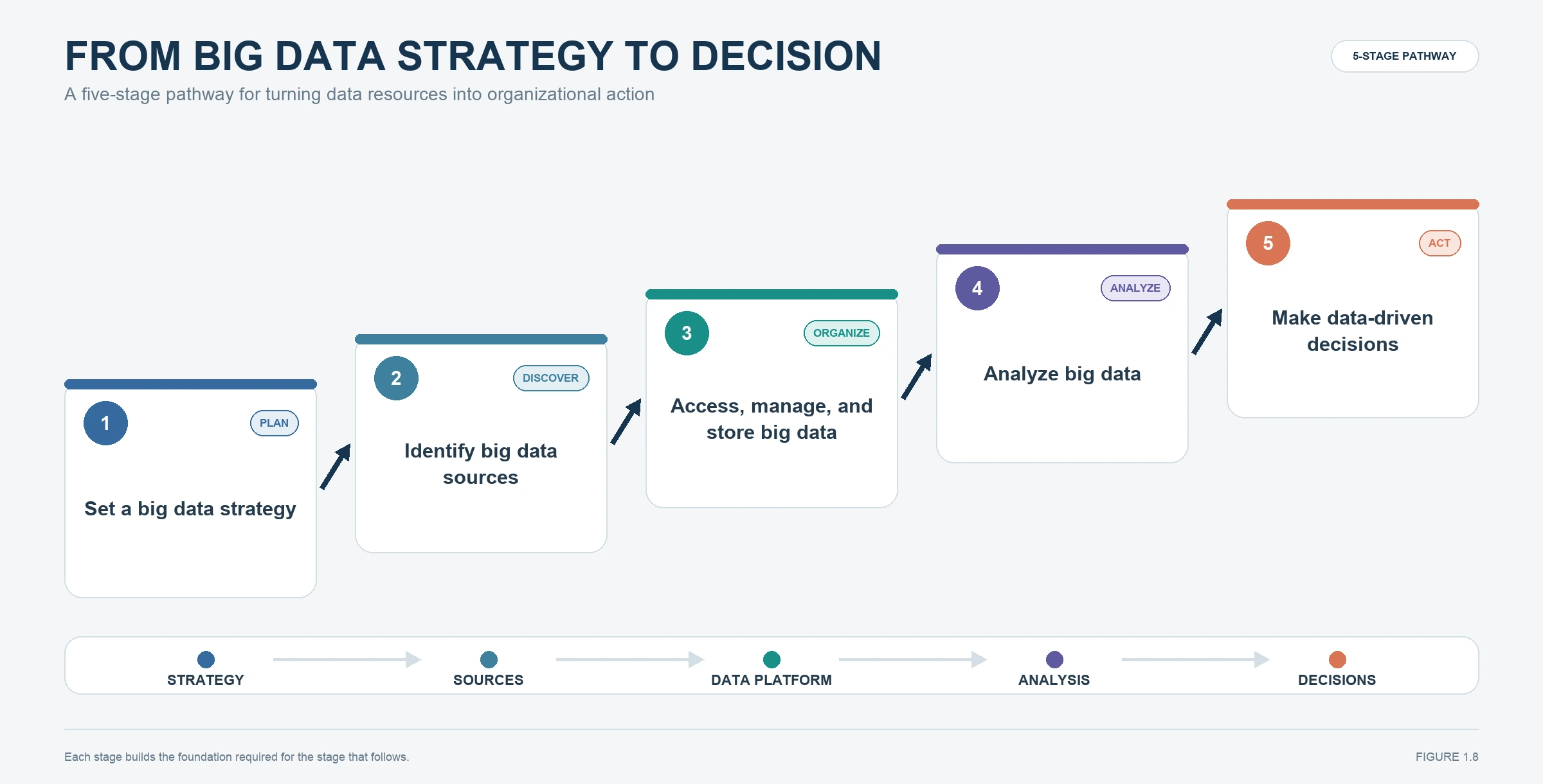
From data strategy to decision
What this visual shows: This visual connects data sources, storage, analysis, and decisions; use it when explaining how source and audit nodes support the project.
What to inspect: Match the decision question to the analytic unit, target or pattern, inputs, success metric, and final action so every downstream node has a stated purpose.
Connection and report use: Match this visual to the Source → Type → Data Audit orientation stream. It verifies how the analysis was set up; describe the material choice in Methods rather than presenting the screenshot as a finding.
3
3. Check suitability and responsibility
Use the final decision pathway before keeping any output. A technically available analysis may still be unsuitable because of privacy, fairness, consent, or decision risk.
ReportReport decision
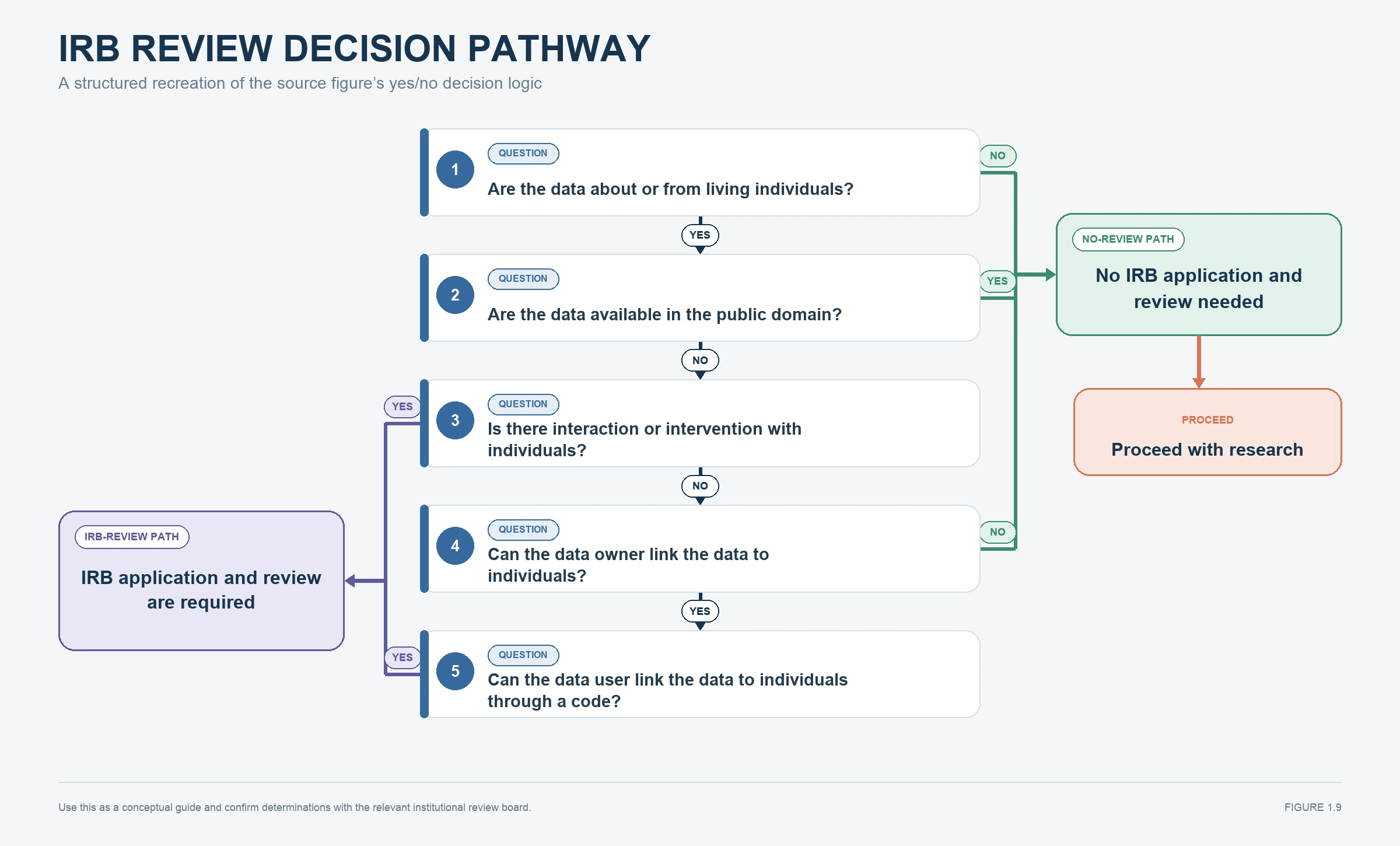
Responsible-use review pathway
What this visual shows: This decision pathway asks whether a data-mining project requires ethics or human-subject review. Use it before analysis when data, participants, or downstream decisions may create privacy, consent, fairness, or harm concerns.
What to inspect: Read the nodes left to right and verify that source, role review, audit, preparation, partition, model, and evaluation appear in a defensible order.
Connection and report use: Use this to decide how to report the evidence: document the project purpose, field roles, data-quality findings, and responsible-use limits before presenting any model claim. Every claim must trace back to a named output, sample or partition, and limitation.
Visual-use rule: Concept diagrams help you understand or justify a method. Interface screenshots verify setup. Output charts and tables may become report evidence only when they answer the project question, come from the correct sample or partition, and are explained in words.
Understand and Interpret the Outputs
How to read the Introduction to Data Mining and Data Science outputs
Do not move directly from Run to Report. Use this sequence to decide what the software found, whether the result is trustworthy, and which evidence is useful enough to keep.
1
Verify the basis
Confirm the dataset, analytic unit, target or pattern, field roles, preparation, sample, and partition behind the output.
2
Read the main result
Name the statistic, pattern, category, component, cluster, rule, or probability in plain language before judging whether it is good.
3
Inspect diagnostics and limits
Check class-level errors, residuals, sample sizes, stability, assumptions, quality measures, comparison baselines, and any sign of leakage or overfitting.
4
Make the report decision
Keep an output only when it answers the project question, comes from the correct evidence base, adds information, and can be explained with an appropriate limitation.
Output
What it means
What to inspect and decide
Use in the report
Source preview
Confirms that the intended file, records, and fields were loaded.
Check the file name, row count, field names, obvious truncation, and whether one row represents the intended unit of analysis.
Methods onlystate the data source and analytic unit; do not present a preview screenshot as a finding.
Type node field metadata
Defines how SPSS Modeler will treat each field.
Check role, storage, measurement level, value labels, missing-value treatment, and whether IDs or post-outcome fields were excluded.
Use when relevantUse a compact data-dictionary table when role or measurement decisions matter.
Data Audit summary
Describes data quality and initial distributions before modeling.
Inspect valid and missing counts, minima and maxima, unusual categories, constant fields, and values outside plausible ranges.
Use when relevantUse a short data-quality table or narrative; include only issues that changed preparation or interpretation.
Orientation stream
Documents the path from source to field review and audit.
Confirm that nodes run left to right and that each node has a clear purpose and readable label.
Use when relevanta stream image can show reproducibility, but it is not evidence of model performance.
Stop and diagnose when...
Stop before modeling if the wrong file is loaded, the unit of analysis is unclear, sensitive data lack an approved use, field roles are wrong, or the audit reveals unexplained missing or impossible values.
Evidence worth keeping
A one-sentence project objective and intended decision
A field-role/data-quality summary
A note describing privacy, fairness, or responsible-use boundaries
From Output to Report
Use this writing pattern
The analysis used [data source and unit of analysis] to examine [project goal]. Initial review identified [important field-role or data-quality finding], which led to [preparation or scope decision]. The results are intended to support [decision or learning purpose] and should not be interpreted as [causal, certain, or otherwise unsupported claim].
Writing rule: Name the evidence first, interpret it second, state a limitation third, and make a recommendation only when the evidence supports one.
Worked Example
A project idea becomes a modeling question
This example shows how a vague idea can become a usable data mining goal.
Planning item
Example
Vague idea
We want to understand customer loyalty.
Better project question
Can we predict which customers are likely to renew membership next month?
Target
Renewal status: renew or not renew.
Possible inputs
Usage frequency, support requests, tenure, plan type, prior renewals, satisfaction rating.
Decision supported
Identify customers who may need retention support.
Ethics caution
Avoid sensitive fields that are not needed or that create unfair treatment.
Example interpretation:
A data mining goal becomes clearer when the learner names the target, possible inputs, audience, and action. This project is predictive because it estimates renewal status for future cases, but the final report should still describe results as predictive patterns rather than proof that one field caused renewal.
Learning Checkpoints
Pause and test your understanding
Use these checkpoints before moving to the practice exercise.
Vocabulary check
Can you explain data mining, data science, and machine learning without using circular definitions?
Goal check
Can you name whether your project is prediction, grouping, comparison, or reporting?
Target check
If your project is supervised, can you identify exactly what field should be predicted?
Ethics check
Can you name one privacy, fairness, or interpretation risk before modeling?
Advanced Layer
Responsible interpretation beyond the buzzwords
Advanced learners should evaluate not only what a model can do, but also what it should not claim.
Issue
Plain-language meaning
How to handle it
How to report it
Prediction versus causation
A model can predict without proving why an outcome happened.
Use causal language only when the design supports it.
Write that the model identified predictive patterns.
Hype risk
AI language can make ordinary analysis sound more certain than it is.
Name the method, data, and validation evidence.
Avoid inflated claims such as automatic truth.
Privacy
Data may contain personal or sensitive information.
De-identify, minimize fields, and follow approval requirements.
State that sensitive data were handled responsibly when relevant.
Bias and fairness
Historical data may contain unequal treatment.
Inspect variables, categories, and outcomes for unfair patterns.
Acknowledge fairness limits when the result affects people.
Model drift
Patterns can change over time.
Retrain or recheck models with updated data.
Mention that deployed models require monitoring.
Common Mistakes
Problems to avoid
Starting with software
Opening SPSS Modeler before defining the question can lead to aimless modeling.
Confusing prediction with explanation
A model that predicts well does not automatically explain causes.
Ignoring data quality
Poor data can produce polished but misleading output.
Using vague goals
A goal such as understand customers is too broad until it names a target, pattern, or decision.
Trusting buzzwords
AI, big data, and machine learning labels do not guarantee useful analysis.
Skipping ethics
Privacy and fairness issues should be considered before data preparation and modeling.
Project Quality Gate
Confirm the project is ready for method selection
Use this checkpoint before treating the lesson as complete for a real assignment, research project, business analysis, or professional report.
Check 1
The project question names the decision, prediction, pattern, or report purpose in plain language.
Check 2
The audience is clear, so the final explanation can match the reader's technical level.
Check 3
The analysis goal is predictive, descriptive, exploratory, or probabilistic rather than vaguely defined as "use machine learning."
Check 4
Privacy, fairness, and responsible-interpretation risks have been noted before data preparation begins.
Evidence to save
A one-paragraph project purpose statement, audience note, expected output type, and responsibility note.
Report standard
Start the report by explaining the problem and why the analysis is useful before naming any algorithm.
Even a technical project needs a clear opening paragraph explaining what kind of analysis is being done and why.
Beginner version:
This project uses data mining to identify patterns that may help predict [outcome]. The goal is to use available data to support [decision or learning goal]. The results should be interpreted as predictive evidence, not automatic proof of cause.
Advanced version:
The analysis frames [problem] as a data mining project because the objective is to use structured data to predict or discover [outcome or pattern]. The modeling strategy should be evaluated using data quality, validation evidence, interpretability, and ethical suitability before the result is used for decision-making.
Report part
What to include
Sentence starter
Purpose
Name the practical or research problem.
This project examines...
Modeling goal
Say whether the work predicts, classifies, groups, or explores.
The goal is to predict...
Audience
Identify who needs the result.
The findings are intended to support...
Caution
Set limits on interpretation.
The model should be interpreted as...
Draft paragraph will appear here.
Practice Exercise
Build your first project framing statement
Choose a project idea. Use a class assignment, business question, research idea, or personal learning example.
Write the question. Make it specific enough that another person can understand the intended outcome.
Name the data. List the type of dataset and the likely fields.
Decide the learning type. Choose supervised, unsupervised, descriptive, or report-focused.
Add one caution. Name a limitation, ethical issue, or reason the result should be interpreted carefully.
Write a final statement. Combine the question, data, model purpose, audience, and caution into one paragraph.
Self-check
If your project statement does not name a goal, data, audience, and caution, it is not ready for model selection yet.
Project Pathways
How to adapt this lesson to your own goal
Class assignment
Focus on definitions, examples, and clear distinctions among data mining, data science, and machine learning.
Research project
Focus on framing research questions, limitations, ethics, and careful interpretation of predictive evidence.
Business project
Focus on decisions, actionability, privacy, and whether a predictive result can actually improve a workflow.
Reflection and Feedback Prompts
Questions to clarify your project
Explain data mining, data science, and machine learning in simpler language.
Help me turn my project idea into a predictive modeling question.
Tell me whether my project is supervised or unsupervised learning.
Check whether I am making causal claims from predictive output.
Help me write an ethical caution statement for my project.
Create a plain-language project framing paragraph.
Lesson Summary
Key takeaways
Data mining focuses on useful patterns and prediction from data.
Data science is broader than model building alone.
Predictive models support decisions but do not guarantee certainty.
The project question should guide the method.
Ethics, privacy, fairness, and cautious interpretation belong at the beginning.